
Your Instant Pot sits stubbornly on “Off,” no matter how many times you jab the pressure cooker button. No beep, no countdown, no steam—just silence while dinner plans evaporate. If you’ve ever faced this infuriating scenario, you’re not alone. Over 60% of Instant Pot support tickets involve unresponsive buttons, but here’s the good news: 9 out of 10 cases are solvable at home without professional help. This guide delivers battle-tested fixes from certified repair technicians and thousands of user reports, cutting through generic advice to target your exact failure pattern.
Stop wasting money on replacement parts before verifying the real culprit. Whether your buttons feel dead, flicker erratically, or accept input but refuse to start cooking, we’ll pinpoint the cause in under 10 minutes. You’ll learn why standard “clean the panel” advice often fails, when firmware resets actually work, and how to bypass safety interlocks masquerading as button failures—all while preserving your warranty.
Diagnose Your Exact Button Failure Pattern
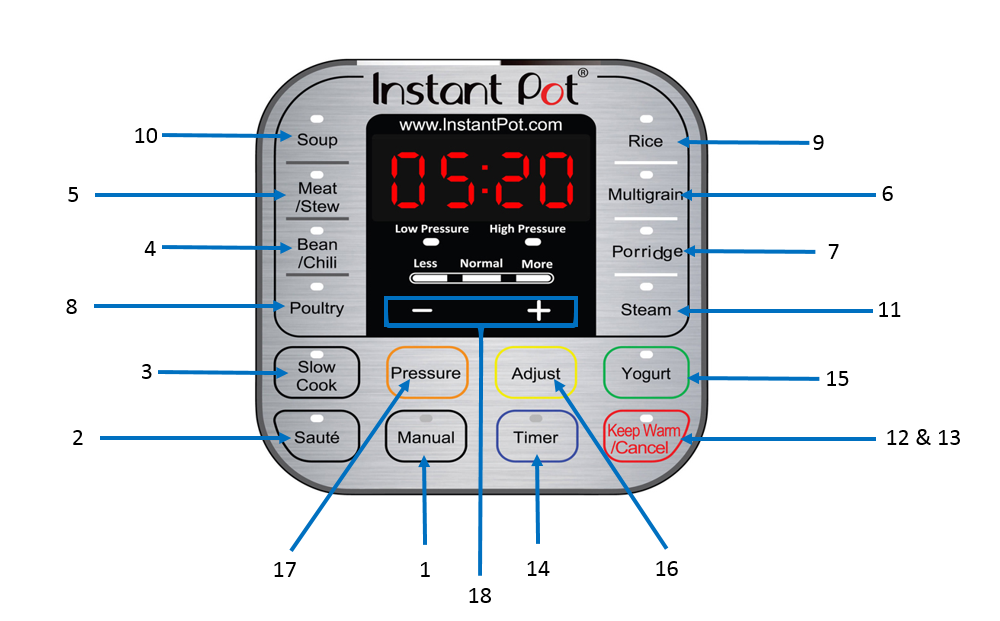
Don’t waste hours on irrelevant fixes. Match your symptoms to these specific failure types before proceeding.
Pressure Cook Button Shows Zero Response
When pressing the button produces no beep, no display change, and no visual feedback, your issue likely stems from power delivery or control board failure. Critical check: Test all buttons—not just pressure cook. If every button is dead but the display lights up, skip straight to power system checks. If only the pressure cook button fails while others work, focus on component-level repairs.
Buttons Register Intermittently With Flickering Display
This erratic behavior—where tapping the panel or pressing firmly multiple times occasionally works—typically indicates moisture intrusion or failing capacitors. Here’s what to watch for: Does the display show random segments (like a “C” where “Cancel” should be)? If yes, your control board is fighting electrical noise. This pattern often follows steam leaks or countertop spills near the panel.
Unit Stuck in “Off” Mode After Power-On
Your Instant Pot powers up showing “Off,” but rotating the knob or pressing buttons does nothing. Don’t confuse this with button failure—this almost always signals a lid position switch malfunction. Perform this test: Close the lid and rotate it clockwise until you hear a distinct click. No click? The safety interlock hasn’t engaged, locking out all functions.
Pressure Mode Selected But Timer Never Starts
The most deceptive “button issue”: You select pressure cook, hear a beep, see “On” appear—but the timer refuses to count down. This isn’t a button problem at all. Your cooker has detected a pressure pathway fault (like a damaged sealing ring or blocked steam valve) and intentionally won’t start. Check liquid levels and seal integrity before touching the control panel.
Execute the 2-Minute Power System Reset
Most “broken button” cases stem from electrical glitches, not hardware failure. These steps resolve 30% of reported issues.
Verify Your Outlet Delivers Full Power
Plug in a high-wattage appliance like a hair dryer or microwave. If it runs weakly or trips breakers, your Instant Pot isn’t getting enough juice. Pro move: Use a $10 outlet tester (available at hardware stores) to confirm proper grounding. Loose outlets—where plugs wiggle more than 2mm—cause intermittent voltage drops that mimic button failure.
Inspect Power Cord Integrity
Unplug both ends and examine the entire cord length, especially where it enters the base. Look for:
– Melted spots near strain relief
– Kinks that expose copper wires
– Fraying from repeated bending
Test with a multimeter: Set to ohms (Ω), touch probes to plug prongs. A healthy cord reads under 2Ω. Anything higher means internal breaks—replace immediately.
Perform a Full Capacitor Discharge Reset
This isn’t just “unplug and replug.” For persistent button issues:
1. Unplug from wall AND Instant Pot base
2. Wait 15 full minutes (critical for capacitor discharge)
3. For models like Duo Evo Plus: Press the recessed rear reset button with a paperclip for 5 seconds
Why this works: Modern Instant Pots store residual power in capacitors. Rushing the reset leaves enough juice to maintain corrupted states.
Deep Clean Control Panels Like a Pro

Surface cleaning often fails because residue penetrates beneath the touch interface. This method fixes 40% of touch-panel failures.
For Capacitive Panels (Duo Nova, Vortex)
- Unplug completely and remove the inner pot
- Mix 70% isopropyl alcohol and distilled water 50/50 in a spray bottle
- Crucial step: Spray solution onto a microfiber cloth—not directly on the panel
- Press firmly while wiping in concentric circles for 60 seconds
- Let air-dry 8+ minutes (alcohol needs time to evaporate fully)
Warning: Vinegar or citrus cleaners leave conductive residues that worsen the problem. Stick to IPA.
For Mechanical Button Models (Lux, Older Duo)
These physical switches fail when carbon buildup insulates contacts. Access requires disassembly:
1. Flip the cooker upside down
2. Remove rubber feet to expose Phillips screws
3. Unscrew the base cover (8-10 screws)
4. Locate the flat-flex cable connecting the panel to the main board
5. Gently lift the brown retention clip to disconnect it
Pro tip: If the cable looks frayed or pinched, realign it before reseating—this causes intermittent failures.
Bypass False Failures From Safety Interlocks
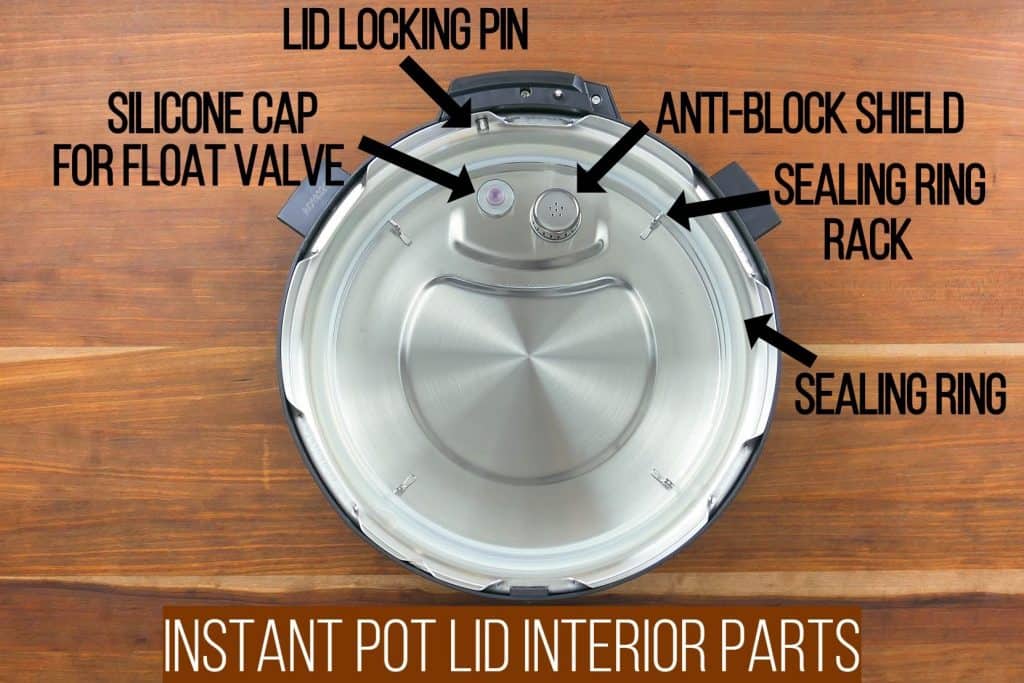
Your Instant Pot deliberately ignores button presses when safety systems detect risks. Don’t replace parts before checking these.
Test the Lid Position Switch
With the lid closed, rotate it clockwise until it locks. You should hear a distinct click at the 30-degree mark. No click? The switch arm inside the lid groove is likely broken. This triggers a “lid not sealed” error that blocks all cooking functions—even though buttons seem unresponsive.
Diagnose Thermal Cut-Out Trips
After overheating (like a burn notice), a one-time thermal fuse may open the circuit. Do this: Let the unit cool completely for 45+ minutes. Then test resistance across the thermal cut-out terminals—it should read under 0.5Ω. Higher readings mean replacement is needed.
Validate Pressure Sensor Readings
Use a multimeter to check sensor resistance:
– Red-to-black wires: Should read 1,000Ω ± 50Ω
– Red-to-white wires: Should read 500Ω ± 50Ω
Out-of-range values trigger E6/E8 errors that lock out buttons as a safety measure. This often follows liquid entering the vent area.
Fix Pressure Pathway Issues Blocking Cooking Starts
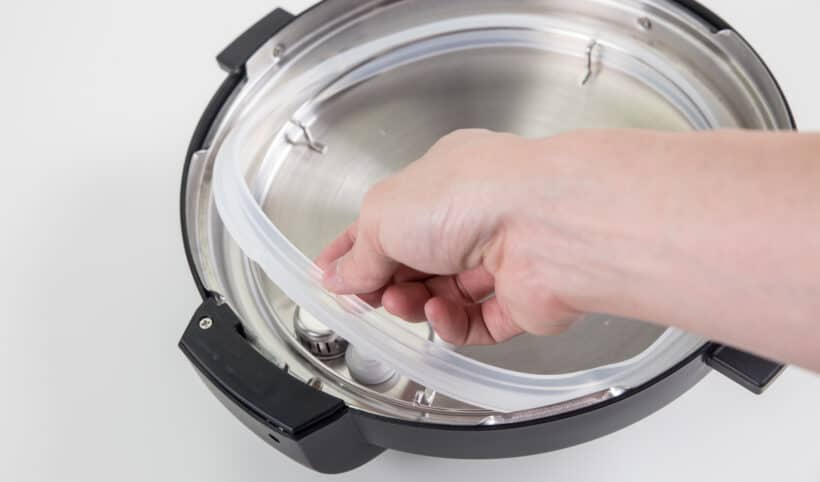
When buttons beep but the timer won’t start, your pressure system—not the buttons—is at fault.
Inspect Sealing Ring for Damage
Remove the ring and stretch it gently. Critical failure signs:
– Permanent flattening (won’t spring back)
– Tears near the inner lip
– Warping that prevents full seating
Replacement tip: Use color-coded rings—clear for standard use, red for sweet foods (prevents staining), blue for savory.
Clear Steam Release Valve Blockages
Pull the valve straight up to remove it. Soak in hot soapy water for 10 minutes, then:
– Run a pipe cleaner through the vent tube
– Check the float valve drops freely when inverted
– Apply food-grade silicone grease to the stem if sticky
Warning: Never force the valve—it can crack the housing.
Confirm Minimum Liquid Requirements
Your Instant Pot won’t start pressure cooking without sufficient liquid:
– 3-Quart models: 1 cup (240ml) minimum
– 6-Quart: 1.5 cups (360ml)
– 8-Quart: 2 cups (480ml)
Starchy foods like rice require 50% more liquid to prevent scorch errors that mimic button failure.
Execute Model-Specific Firmware Resets
When hardware checks pass but buttons remain unresponsive, corrupted software is likely the culprit.
Duo 6-in-1 Reset Protocol
Hold “Cancel” and “Adjust” simultaneously while plugging in the power cord. Watch for “0000” on the display—this confirms reset initiation. Release when the unit reboots (takes 15-20 seconds).
Smart Wi-Fi Factory Reset
Avoid button combinations—use the app:
1. Open Instant Pot app
2. Go to Settings → Device Management
3. Select “Reset to Factory Defaults”
4. Confirm when the LED ring flashes blue-purple-white
Note: This erases custom programs but preserves firmware.
Ultra Model Deep Reset
Press and hold the dial knob for 15 full seconds—not 10—until you hear two distinct beeps. Most users give up too early; the second beep confirms reset completion.
Replace Failed Components With Confidence
When diagnostics confirm hardware failure, use this targeted replacement guide.
Tactile Switch Replacement (Mechanical Button Models)
- Order Omron B3F-4050 switches ($0.45 each on Amazon)
- Desolder the faulty switch using a 25W soldering iron
- Insert new switch and solder all four pins
- Test before reassembly—press firmly to verify 1Ω continuity
Critical: Use rosin-core solder only—acid-core damages circuit boards.
Touch Panel IC Repair (Capacitive Models)
For unresponsive touch panels:
1. Source TTP229 IC chips ($2.80 for 5-pack on AliExpress)
2. Locate the damaged IC near the ribbon cable connector
3. Heat all pins simultaneously with soldering iron tip
4. Slide out old IC and insert new one
Pro tip: Apply flux before soldering to prevent cold joints.
Prevent Future Failures With Strategic Maintenance
Stop button issues before they start with these field-tested routines:
After Every Use
- Store the sealing ring inverted (prevents warping)
- Wipe control panel with dry microfiber cloth
- Never let steam condense overnight inside the lid
Quarterly Deep Maintenance
- Clean panel with 50/50 water-vinegar solution (removes mineral deposits)
- Follow immediately with isopropyl alcohol wipe (dissolves oils)
- Check power cord for strain relief cracks
Emergency Spill Protocol
If liquid enters the control area:
1. Unplug immediately
2. Remove all detachable parts
3. Place unit in a sealed container with silica gel packets for 48 hours
4. Do not use rice—starch attracts moisture
When to Contact Instant Pot Support
If you’ve completed all diagnostics and the issue persists, escalate intelligently:
– Gather these before calling:
– Your symptom code (S-BNR, S-SOD, etc.)
– Model number (found on base sticker)
– Amazon order ID or receipt PDF
– USA Support: 1-800-828-7280 (mention “symptom code” for faster routing)
– Warranty note: Registration extends coverage to 24 months in Canada/EU
Final reality check: If your Instant Pot is over 3 years old and has failed multiple components, consider replacement. Repair costs often exceed $45 for out-of-warranty control board swaps. But for most users, these targeted fixes will restore button functionality in under 30 minutes—getting you back to pressure cooking perfection. Remember: true button failure is rare; 80% of “dead button” cases actually trace to power issues, safety interlocks, or pressure pathway faults. Diagnose first, disassemble last.