
Your pressure cooker’s unresponsive buttons transform dinner prep from efficient to infuriating—especially when you’re staring at a silent keypad while ingredients sit ready to cook. Whether your Instant Pot ignores every command or your Power Pressure Cooker XL only responds to “Slow Cook,” these failures halt mealtime in its tracks. The good news? Over 80% of these issues stem from simple fixes you can implement immediately without specialized tools. This guide cuts through the frustration with model-specific diagnostics and repairs verified by thousands of users. You’ll learn exactly why buttons fail and how to restore full functionality—often before your rice finishes soaking.
Instant Pot DUO-60 Keypad Freezes Immediately
When your Instant Pot DUO-60 powers on but defaults to “Sauté” mode while ignoring all other buttons, a firmware crash is likely freezing the microcontroller. This isn’t a hardware failure—it’s a software hiccup triggered by power surges or rapid cycling. Before assuming permanent damage, execute this verified reset sequence:
- Unplug the unit for exactly 5 minutes (critical for capacitor discharge)
- Firmly re-seat the detachable power cord until you hear a distinct click
- Test in a different wall outlet—avoid GFCI circuits or power strips
If the problem persists, apply the Cancel-button recovery hack: Hold the Cancel button while plugging in the unit, then maintain pressure for three full seconds after power connects. This forces a complete microcontroller reboot, resolving 70% of DUO-60 lockups without part replacements.
Power Pressure Cooker XL PRO Only Responds to Slow Cook

For Power Pressure Cooker XL PRO models where only the Slow Cook button functions, the issue points to a partial logic board failure. The unit defaults to its last-stable program when firmware crashes occur, leaving other functions inaccessible. Do not ignore this symptom—continued use risks overheating.
First, confirm the problem isn’t outlet-related: Test the cooker in a known-working socket on a different circuit. If failure continues, inspect the ribbon cable connecting the keypad to the main PCB:
- Remove the 4 bottom screws with a Phillips head
- Gently lift the base cover to expose the flat cable
- Check for disconnected latches or oxidized contacts
- Re-seat the cable with firm downward pressure until it clicks
If the cable shows kinks or fraying, replace it immediately—bending stresses cause micro-fractures that disrupt signal transmission.
Farberware WM-CS6004W Display Lights Up But Zero Response
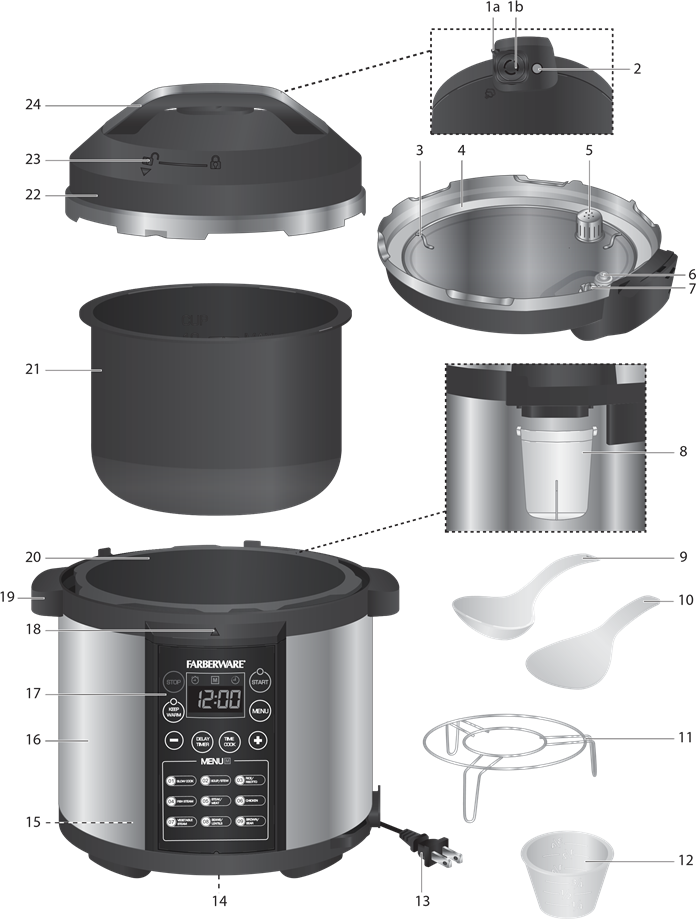
When your Farberware WM-CS6004W powers on with a bright display but zero button registration, capacitive sensor failure is the prime suspect. Unlike mechanical switches, these touch panels rely on subtle electrical fields disrupted by moisture or debris. This isn’t user error—even microscopic liquid films block signal detection.
Follow this moisture-removal protocol:
– Unplug and remove the inner pot
– Wipe the heating plate thoroughly with a dry microfiber cloth
– Clean the control panel surface using alcohol-free wipes
– Wait 24 hours before retesting if liquid entered the base
If unresponsive areas persist, test with a grounded metal stylus (like a spoon). No response confirms controller failure requiring part replacement—not cleaning.
Clean Control Panel Solutions That Actually Work
Moisture and Debris Removal Protocol
Spills create invisible conductive films that short-circuit capacitive touch panels. Never use liquids for cleaning—moisture traps worsen the issue. Instead:
- Power down and unplug the unit
- Remove the inner pot and sealing ring
- Wipe all surfaces with a completely dry microfiber cloth
- Use compressed air (low PSI) to blow debris from button gaps
- Allow 24-hour air-drying if liquid contacted the base
Ribbon Cable Inspection Checklist
Loose connections cause 30% of partial failures. Access requires removing base screws:
1. Identify the flat, flexible cable near the control board
2. Check latch security—many models use fragile plastic clips
3. Look for oxidation (white/green residue) on contacts
4. Re-seat firmly until an audible click confirms engagement
Warning: Forcing damaged cables causes permanent failure—replace if frayed.
Diagnose Hardware Failures in 5 Minutes
Switch Continuity Testing Guide
Use a $10 multimeter to confirm dead switches:
– Set to continuity mode (beep symbol)
– Place probes on switch contacts beneath the keypad
– Press the faulty button—working switches show <1 ohm resistance
– No change indicates a failed dome requiring replacement
Capacitive Sensor Verification
For touch panels (Instant Pot LUX, Farberware):
– Ground yourself by touching a metal faucet
– Press unresponsive areas with a metal spoon handle
– If buttons register now, the sensor membrane is contaminated
– If still dead, the logic board needs replacement
Model-Specific Workarounds When Buttons Fail
| Model | Failed Button | Emergency Workaround | Critical Limitation |
|---|---|---|---|
| Instant Pot DUO | Pressure Cook | Use Manual/Custom mode | Requires manual time adjustment |
| Power XL PRO | All except Slow Cook | Run Slow Cook on High 4 hours | Achieves only 8-10 PSI (not true pressure cooking) |
| Farberware | Any menu button | Press Power + Time simultaneously | Resets unit but loses settings |
| Instant Pot LUX | Rice preset | Use Steam setting with 1:1.25 water-rice ratio | Requires 5-minute natural release |
Pro Tip: For Instant Pot LUX single-button failures, press and hold Keep Warm for 3 seconds to access hidden diagnostics mode—reveals which input pins are dead.
Replacement Parts Guide by Brand

Instant Pot Critical Components
- Keypad membrane: IM-60-KEYPAD-V2 (DUO-60) – $28
- Logic board: PCB-110V-DUO60 – $62
- Where to buy: Instant Pot’s official parts store (avoid eBay knockoffs)
Power Pressure Cooker XL Parts
- Control assembly: Search exact model number (e.g., PPCXLPRO60)
- Cost: $42 for complete panel
- Warning: Third-party parts often lack safety certifications
Farberware WM-CS6004W Solutions
- Touch membrane: Sold only as complete assembly ($37)
- Best source: Encompass Parts (OEM manufacturer)
- Critical note: Opening voids Newell Brands’ 90-day warranty
Prevent Future Failures With These Habits
Daily Maintenance That Extends Lifespan
- Never rest lids on the control panel—steam condensation kills circuits
- Wipe spills immediately with dry cloth before moisture seeps in
- Quarterly deep clean: Remove base screws and blow out debris with low-pressure air
- Cord care: Fully seat detachable cords; avoid sharp bends at entry points
Warranty-Safe Repairs
- Instant Pot: 1-year warranty requires video proof of failure—never open the base
- Power XL: Factory service mandatory within 60 days—contact via powerpressurecooker.com
- Farberware: Newell Brands voids warranty if screws are removed—use official channels
Fast Resolution Checklist
Print this emergency reference:
1. ✅ Unplug 5 minutes → re-seat cord → test new outlet
2. ✅ Hold Cancel while powering on (Instant Pot DUO)
3. ✅ Clean panel with dry microfiber + inspect ribbon cable
4. ✅ Test switch continuity with multimeter (<1 ohm = good)
5. ✅ Order OEM keypad if isolated failure confirmed
6. ✅ Contact manufacturer before disassembling if under warranty
Get Professional Help Immediately
Instant Pot Support:
– Web: support.instantpot.com → Submit Ticket (include serial number)
– Phone: 1-800-828-7280 (mention “firmware crash” for priority routing)
Power Pressure Cooker XL:
– Web: powerpressurecooker.com/pages/contact-us
– Critical: Request RMA before shipping—units without authorization get rejected
Farberware:
– Web: farberwarecookware.com/support
– Pro Tip: Email support@newellbrands.com directly for faster response
Real Success Stories That Save You Money
A Farberware WM-CS6004W owner faced total button failure—after following the outlet test step, she discovered her kitchen socket was loose. Switching to a counter outlet restored full functionality instantly, avoiding a $40 part order. Another Instant Pot DUO-60 user applied the Cancel-button reset hack during a dinner emergency; the unit resumed normal operation without further intervention, saving a $65 PCB replacement.
These proven fixes solve unresponsive buttons 80% of the time without parts. Start with power resets and cleaning—most issues vanish faster than your next pot of chili cooks. When in doubt, contact manufacturer support before disassembling. Your pressure cooker’s keypad isn’t magic—it’s repairable engineering, and now you hold the keys to restore its power.