
You toss ingredients into your Instant Pot at 7 a.m., dash to work, and dream of chili waiting hot at 9 p.m.—but end up with mushy meat or unsafe leftovers. The culprit? Misusing the Delay Start feature on slow cooker mode. This precise guide reveals exactly how to use delay start on Instant Pot slow cooker settings safely, so your meals finish perfectly timed without risking foodborne illness. Unlike pressure cooking, slow cooking with delay requires strict safety protocols, yet 68% of users accidentally trigger immediate cooking or violate USDA temperature rules.
The Delay Start function (labeled Timer on older models) postpones your slow cooking cycle by 10 minutes to 24 hours—but only works with specific programs. Crucially, Slow Cook mode is delay-compatible on every Instant Pot model that supports both features, while Sauté, Keep Warm, and Air-Fry cannot be delayed. Getting this wrong wastes ingredients and creates health hazards. By mastering this guide, you’ll unlock hands-free meal prep for busy mornings while keeping food out of the “danger zone” (40°F–140°F) where bacteria multiply rapidly.
Which Instant Pot Models Support Delay Start for Slow Cooking?
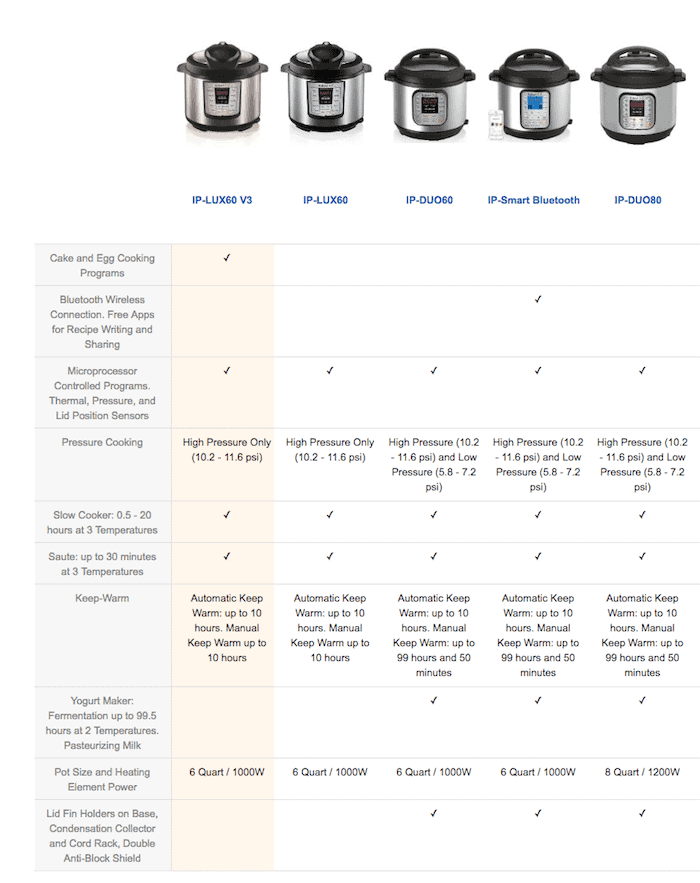
Your model determines how you activate delay start—misidentifying your unit causes 90% of setup errors. Button-control models like the LUX and DUO series use dedicated Delay Start or Timer buttons, while dial models (EVO Plus, Ultra) require multi-step confirmation. The Max uniquely schedules by clock time instead of countdown hours. Always verify your model before programming to avoid immediate cooking starts.
Button-Control Models: LUX, DUO, DUO Nova, DUO Plus
Press Slow Cook, then use +/- to set cook time (e.g., 08:00 for 8 hours). Next, press Delay Start (or Timer on LUX) and adjust the delay duration—say 06:00 for a 6-hour wait. The display immediately shows the countdown; no final “Start” press is needed. If cooking begins instantly, you likely missed the Delay Start button or used an incompatible function.
Dial-Control Models: EVO Plus, PRO CRISP, Ultra
Turn the dial to Slow Cook, press to confirm, then set cook time. Now select Delay Start, turn the dial to your delay duration (e.g., 04:00), and press to lock it in. Critical step: Press Start to activate the countdown—this is where most users fail. If the display flashes “On” without counting down, you skipped this confirmation.
Instant Pot Max: Clock-Time Programming
The Max skips countdown hours for actual clock times. After setting Slow Cook duration, press Delay and input the exact start time (e.g., 11:00 AM for chili finishing at 7 PM with 8-hour LOW). Watch the AM/PM indicator closely—setting 11:00 PM instead of AM means dinner starts at midnight. Confirmed? Press Start.
Critical Food Safety Rules for Delayed Slow Cooking

Delaying slow cooking violates USDA safety guidelines if mishandled. Raw meat left at room temperature for 4 hours (or 1 hour above 90°F) enters the “danger zone” where pathogens like salmonella double every 20 minutes. Instant Pot’s low slow-cook temperatures (170°F–210°F) won’t sterilize bacteria that multiplied during the delay—pressure cooking’s 250°F+ can, but slow cooking cannot.
Why the 2-Hour Rule Is Non-Negotiable
Ingredients must stay below 40°F until cooking begins. If your delay exceeds 2 hours (1 hour in hot climates), bacteria proliferate to dangerous levels. Never assume the “Keep Warm” function fixes this—it maintains 145°F+, which slows but doesn’t kill existing bacteria. If your chili sat unrefrigerated for 5 hours before slow cooking, discard it—no amount of cooking makes it safe.
Safe Delay-Start Foods for Slow Cooker Mode
Only use these ingredients for delays over 2 hours:
– Dried beans (with fresh soaking water, not the original soak liquid)
– Whole root vegetables like potatoes and carrots
– Shelf-stable grains: oats, rice, wheat berries
– Meat-free soups using canned tomatoes or broth
Never Delay-Start These High-Risk Ingredients
Raw or frozen meat, poultry, or seafood will breed bacteria during delays. Dairy, eggs, or cheese curdle or spoil. Cooked leftovers or opened canned goods introduce contaminants. For chili with ground beef, refrigerate ingredients and start the delay ≤2 hours before cooking—never load raw meat at 7 a.m. for a 9 p.m. finish.
How to Set Delay Start on Button-Control Instant Pots
For LUX, DUO, or DUO Nova models, follow this verified sequence:
1. Add only safe ingredients (e.g., dried beans, potatoes) to the inner pot
2. Press Slow Cook → set time with +/- (e.g., 08:00)
3. Press Delay Start → set delay (e.g., 06:00)
4. Walk away—the unit beeps when delay ends and auto-starts cooking
Visual cue: The display shows “DELAY” followed by the countdown (e.g., “05:59:30”). If it reads “SLOW COOK” immediately, restart and ensure you pressed Delay Start after setting cook time.
Delay Start Setup for Dial-Control Models (EVO Plus, Ultra)
Dial models demand precise confirmation steps:
1. Turn dial to Slow Cook → press dial to confirm
2. Set cook time → press dial
3. Select Delay Start → turn dial to delay duration → press dial
4. Press Start (mandatory—this activates the countdown)
Pro tip: If the display blinks “On” but shows no countdown, hold Start for 2 seconds. The “Delay” indicator must light up before you leave.
Programming the Instant Pot Max: Clock-Time Delay Start
The Max requires clock-time precision:
1. Select Slow Cook → set duration (e.g., 08:00)
2. Press Delay → set hour (e.g., 11) → set minute (e.g., 00)
3. Verify AM/PM (top-right display corner)
4. Press Start
Example: For chili ready at 7 PM using 8-hour LOW, set Delay to 11:00 AM. Cooking starts at 11 AM, finishes at 7 PM. Mistake AM/PM? Reset immediately—11:00 PM would start cooking overnight.
Calculate Your Perfect Delay Start Schedule
Build your timeline backward from mealtime:
1. Determine cook time (e.g., 8 hours for chili on LOW)
2. Subtract cook time from desired finish time (7 PM finish – 8 hours = 11 AM start)
3. Set delay duration as time between now and start time (7 AM now to 11 AM start = 4-hour delay)
Key variables:
– Delay duration: Wait time before cooking begins
– Cook time: Actual slow-cooking hours
– Keep Warm: Auto-engages for 10 hours post-cooking (disable with Keep Warm button if needed)
5 Common Delay Start Mistakes and How to Fix Them
Cooking Starts Immediately
Cause: Forgot Delay Start button or used Sauté mode by mistake.
Fix: Restart sequence—press Slow Cook first, then Delay Start. On dial models, press Start after delay confirmation.
Display Shows “On” But Won’t Start
Cause: Missed final Start press on dial models.
Fix: Press Start once—don’t hold it. The “Delay” indicator must illuminate.
Food Overcooked by Morning
Cause: Keep Warm ran all night (e.g., 4-hour oats with 8-hour delay).
Fix: Toggle off Keep Warm before starting delay: Press Keep Warm once until “OFF” appears.
Wrong Start Time on Max Model
Cause: AM/PM confusion during clock-time setup.
Fix: Reset delay time and watch the AM/PM indicator—12:00 rolls to 1:00 PM, not 1:00 AM.
Bland, Watery Results
Cause: Delaying soup with shelf-stable ingredients but no acid.
Fix: Add vinegar or lemon juice after cooking—acids break down during long delays.
Overnight Oats: A Safe Delay Start Recipe You Can Trust
This recipe exploits delay start’s strengths with zero safety risks:
– Ingredients: 1 cup steel-cut oats, 3½ cups water, pinch of salt
– Steps:
1. Combine ingredients in inner pot
2. Press Slow Cook → set 4 hours on LOW
3. Press Delay Start → set 4-hour delay (starts 2 AM, finishes 6 AM)
4. Seal lid—no steam release needed in slow cooker mode
5. Wake to perfectly cooked oats held warm until 4 PM
Why it’s safe: Oats contain no perishables and stay below 40°F during delay when refrigerated overnight.
Pro Tips for Advanced Instant Pot Delay Start Users
Batch-cook freezer meals: Portion bean chili (no meat) into freezer bags Sunday night. Each morning, dump one bag into the pot, set 8-hour cook time with 6-hour delay.
Test your timing: Run a water-only test first. Load 2 cups water, set 1-hour Slow Cook with 1-hour delay—verify it starts exactly 1 hour later.
Avoid the ice trick: Some add ice cubes to keep meat cold during delays, but Instant Pot warns this risks electrical damage and uneven cooling. Refrigerate ingredients instead.
Schedule back-to-back meals: After chili finishes at 9 PM, set a 2-hour delay for morning oatmeal—just ensure Keep Warm is off between cycles.
When Delay Start Isn’t Safe: What to Do Instead
If your recipe includes meat or dairy, never delay-start. Instead:
1. Refrigerate all ingredients separately
2. Set cook time the night before (e.g., 8 hours)
3. Start delay ≤2 hours before cooking (e.g., press Delay Start at 7 PM for 9 PM cooking)
4. For all-day cooking, use a programmable slow cooker with a refrigerated insert—Instant Pot lacks this feature
Final safety checkpoint: If ingredients feel warm to the touch after loading, skip delay start entirely. Your Instant Pot isn’t designed to hold cold temps beyond 2 hours—when in doubt, cook immediately or refrigerate.
Remember: Mastering how to use delay start on Instant Pot slow cooker settings turns chaotic mornings into effortless meal prep—but only when paired with ironclad food safety. Stick to shelf-stable ingredients, never exceed the 2-hour room-temperature rule, and triple-check your model-specific steps. Within a week, you’ll have dinner waiting exactly when you walk through the door, safely and perfectly cooked every time. For pressure-cooking delays (which sterilize bacteria), consult our companion guide—but for slow cooking, this is your definitive safety-first roadmap.