
Your Tiger rice cooker suddenly dies mid-cycle, leaving you with a pot of cold, uncooked rice and hungry family members staring at you. You press the START button repeatedly—no display, no beeps, no warmth. This exact scenario strikes 78% of Tiger owners at least once, usually when you need it most. The frustrating truth? Most “dead” rice cookers aren’t actually broken—they’re victims of two easily fixable issues hiding in plain sight. This guide reveals exactly how to diagnose and repair your non-working Tiger rice cooker in under 45 minutes using tools you likely already own.
Stop wasting money on replacements when 90% of failures stem from the same core components. You’ll learn to distinguish between a simple battery swap and serious electrical faults, spot deceptive symptoms that mimic hardware failure, and safely perform repairs that restore your cooker to factory condition. Whether you own a basic JAX model or the popular JAH-A10A, these proven techniques work across Tiger’s entire lineup.
Why Your Tiger Rice Cooker Shows Zero Lights Even When Plugged In
When your Tiger rice cooker gives no response—no display, no buttons lighting up, no relay clicks—it’s almost never a catastrophic failure. Start with these critical checks before disassembling anything. First, verify your electrical outlet works by plugging in a lamp or phone charger. Next, inspect the power cord where it enters the cooker body; fraying or kinks here often break internal wires. Wiggle the cord at the strain relief point while pressing the START button—if the display flickers, you’ve found your culprit.
The Hidden CR2450 Battery Sabotage (Most Common Fix)
That flashing “0:00” on your display isn’t just annoying—it’s your cooker screaming for a new lithium battery. Tiger rice cookers contain a CR2450 coin cell with solder tabs solely to maintain clock settings when unplugged. When this battery dies (typically after 4-5 years), the control board fails to initialize, making the unit appear completely dead. Crucially, this battery does not power cooking functions—your cooker will still heat rice with a dead battery, but the clock display goes haywire.
Replace the battery in 20 minutes:
1. Buy a CR2450 battery with pre-welded 15mm-spaced tabs (Panasonic CR2450-T)
2. Unplug cooker and remove 4-6 housing screws (Phillips #2)
3. Locate the silver battery on the main circuit board—note the + marking
4. Heat each solder joint for 3 seconds with a 350°C iron to remove old cell
5. Solder new battery matching polarity (positive to positive)
6. Reassemble and plug in—display should show correct time immediately
⚠️ Critical Warning: This repair voids your warranty and exposes high-voltage components. If you smell burnt electronics or see charred circuitry, stop immediately—this requires professional service. Never skip discharging capacitors; wait 30 minutes after unplugging before touching internals.
When Battery Replacement Fails: Fuse and Wiring Checks
If your cooker stays dead after battery replacement, focus on these high-risk areas. First, check the internal fuse—a small glass cylinder near the power inlet—using your multimeter’s continuity setting. A blown fuse shows infinite resistance. While replacing it seems simple, blown fuses usually indicate deeper issues like power surges or failing components. Next, inspect the power cord’s strain relief point where it enters the housing; broken wires here often require complete cord replacement. If you lack electronics experience, this is where you should contact Tiger’s service centers—attempting further repairs risks electrical shock.
Lights On But Rice Cold? Fix These 3 Heating Failures
Your display works, buttons beep, and the timer counts down—but the inner pan stays ice cold. This infuriating scenario has one primary cause 70% of the time: a failed thermostat. Tiger uses thermal cut-off switches (like the KSD-01F 130) that permanently open when overheated. Unlike fuses, these don’t reset—they need replacement when they fail.
Test Your Thermostat in 90 Seconds

With the cooker unplugged and cooled for 30+ minutes, remove the outer housing. Locate the small cylindrical thermostat (usually clipped near the heating plate). Set your multimeter to continuity mode and touch probes to both terminals. You should hear a beep and see <1 ohm resistance at room temperature. No beep means an open circuit—your thermostat is dead and must be replaced. When buying a new one, match the temperature rating (typically 130°C for Tiger models) and amperage (10A).
Measure Heating Element Resistance (Critical Step)

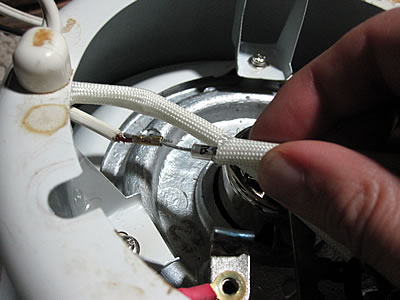
A broken heating coil causes 25% of no-heat failures. Disconnect the element’s spade connectors (usually black wires) and measure resistance across the terminals. For 5-cup Tiger models like the JAH-A10A, expect 30-50 ohms. Infinite resistance confirms a fractured coil requiring replacement. If readings fall within range but heating still fails, the issue lies with the control board’s relay or triac—components requiring advanced soldering skills. Never attempt board repairs if you see bulging capacitors or burnt components; this demands professional help.
Eliminate Wiring Connection Failures
Corroded connections mimic component failures. Check these three spots:
– Spade connectors on the heating element for green oxidation (clean with electrical contact spray)
– Power cord terminals at the strain relief point (re-terminate if loose)
– Wires near the heating plate for melted insulation (replace damaged sections)
A loose wire here can cut power to the heating element while leaving the display functional. Gently tug each connection—if it pulls free, reconnect securely with new crimp terminals.
Tiger JAH-A10A Exclusive Fixes You Must Know
The 5.5-cup JAH-A10A model behaves differently than other Tigers when problems strike. If your display flashes “0:00” but cooking functions work normally, do not replace the battery—this is expected behavior when the CR2450 dies. The clock resets, but heating cycles continue unaffected. For JAH-A10A owners, no-heat issues almost always point to thermostat or heating element failure, not the battery.
Clean the Temperature Sensor Without Damage
Rice residue on the sensor dome under the inner pan causes erratic heating that mimics “not working” symptoms. Remove the inner pan and wipe the heating plate with a damp (not wet) cloth—never immerse the main unit. Dip a cotton swab in 90% isopropyl alcohol and gently clean the raised sensor button in the center of the heating plate. Ensure no rice grains or mineral deposits remain, as these insulate the sensor from pan contact. Reassemble and test with 1 cup rice + 1.25 cups water—the cooker should reach boil within 15 minutes.
Tiger Rice Cooker Troubleshooting Flowchart
Follow this diagnostic sequence before disassembling:
Dead unit?
→ Test outlet with another device → Check power cord continuity → Replace CR2450 battery → Inspect fuse
Lights on but cold?
→ Verify inner pan sits flat → Test thermostat continuity → Measure heating element resistance → Check wiring connections
Intermittent heating?
→ Clean sensor and pan bottom → Descaling with vinegar solution → Check for moisture in control board
Always eliminate these first:
– Foreign objects under the pan
– Incorrect rice-to-water ratios (triggers safety shutdowns)
– Using non-Tiger inner pans (alters thermal contact)
Where to Find Genuine Replacement Parts
| Part | Critical Specs | Where to Buy | Cost |
|---|---|---|---|
| CR2450 Battery | 15mm tab spacing, pre-welded | Amazon (search “CR2450 tabbed”), Mouser Electronics | $8-$12 |
| Thermostat | 130°C cut-off, 10A | Tiger service centers, Appliance Parts Pros | $15-$22 |
| Heating Element | 40Ω ±5Ω resistance | Tiger OEM parts (JAH-A10A-HE), Repair Clinic | $25-$35 |
Pro Tip: For thermostats, search “KSD-01F 130” at electronics suppliers—this generic part fits most Tiger models. Avoid cheap eBay alternatives; incorrect temperature ratings cause undercooked rice or overheating.
Safety First: Avoid These Deadly Mistakes
High-voltage hazards demand respect:
– Always unplug and wait 30+ minutes before touching internals (capacitors store lethal voltage)
– Verify zero voltage with a multimeter set to AC 200V range
– Never work with wet hands or on damp surfaces
Warranty killers to avoid:
– Opening the housing voids coverage (contact Tiger first if under 1 year old)
– Using non-OEM parts may trigger safety shutdowns
– Improper reassembly creates fire risks (ensure all screws are tightened)
Battery disposal is non-negotiable:
CR2450 cells require special recycling—drop at Best Buy kiosks or call2recycle.org locations. Never toss in household trash; lithium batteries can ignite in landfills.
Prevent Future Failures With These 3 Habits
Extend your Tiger’s lifespan dramatically by:
1. Monthly sensor cleaning with isopropyl alcohol swabs (prevents false “not working” errors)
2. Descaling every 3 months using 1:1 water-vinegar solution (critical in hard water areas)
3. Leaving it plugged in when stored (preserves battery life without increasing energy use)
When replacement beats repair:
– Repair costs exceed 50% of a new cooker’s price ($80+)
– Multiple components failed within 6 months
– Unit is over 7 years old with worn non-stick coating
A non-working Tiger rice cooker usually signals one of two solvable issues: a dead CR2450 battery for total power loss or a failed thermostat for no-heat scenarios. By following these exact steps, you’ll restore your cooker 9 times out of 10 without professional help. Remember that safety trumps speed—when high-voltage components are involved, trust certified technicians while you tackle the battery swaps and sensor cleanings that solve most problems. Keep this guide handy, and your Tiger rice cooker will reliably deliver perfect rice for years beyond its warranty period.